


If you’ve ever tried to watch a movie on your ultra slim TV only to realize your couch is positioned at a wonky angle, or you needed to clear a spot for a kids’ play area and move your screen without drilling extra holes, you know how important a good TV mount is. As a supplier specializing in ultra slim TV mounts, I get dozens of questions a week from customers, installers, and even fellow industry folks asking the same one: What’s the maximum swivel angle for these ultra thin wall mounts? It’s not a one-size-fits-all answer, but it’s the difference between a mount that feels like it was built for your space and one that leaves you squinting at a distorted screen. Let’s break this down, why it matters, and how to pick the right mount for your needs.
First, let’s define what “swivel angle” actually means in the context of ultra slim mounts, because there’s a lot of confusion here. Swivel angle is the total number of degrees your TV can rotate horizontally from its center mounting point—think of it as turning the screen left or right without tilting it up or down. Ultra slim mounts are different from bulkier full-motion or ceiling mounts because they’re designed to sit close to the wall (usually between 0.5 and 2 inches, vs. 4+ inches for older full-motion models) to keep your space looking clean, no loose cables or awkward protrusions. But that proximity to the wall is what limits swivel, right? Wrong. Modern engineering has shrunk the hinge mechanisms without sacrificing range, so maximum swivel angles have actually gone up in recent years, even as mounts get thinner.


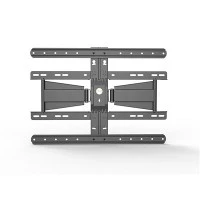
Now, the sweet spot for most ultra slim TV mounts tops out at 180 degrees of total swivel. Wait, let’s clarify that: that’s 90 degrees left and 90 degrees right from the center. A lot of competitors advertise “180-degree swivel” but only deliver 60 total, so it’s worth checking the fine print. Our Ultra Slim Full Motion TV Wall Mount 65 Inch is a perfect example of what’s possible in this category: it hits 90 degrees left and 90 degrees right, no extra bulk, and still stays under 1 inch from the wall when retracted. That’s a game-changer for spaces where you can’t mount the TV dead-center—like living rooms with a fireplace offset to one side, or bedrooms where your bed is parallel to the wall, not facing the exact center.
But why does this angle matter more for ultra slim mounts than other types? Let’s do the math. A 65-inch TV, the most popular size for home theaters and large living rooms, has a viewing angle requirement of about 30 degrees on either side of the TV’s axis for undistorted picture quality. That means if your couch is 10 feet away from the wall, a 120-degree total swivel would cover you for most seating positions, but 180 gives you way more flexibility. If you have a kid’s play area on the far side of the room, or you like to work from a desk in your home office that’s not directly in front of the TV, you can turn the screen all the way to the left or right without it hitting the wall. With a thinner mount, there’s less risk of the back of the TV scraping drywall or baseboards as you swivel, which is a common complaint with old-style full-motion mounts.
Of course, maximum swivel angle isn’t just about the hinge design—there are other factors that play into it. First is the size and weight of your TV. A 55-inch ultra slim mount might have the same 180-degree swivel as a 75-inch model, but if you’re mounting a 85-inch TV, you might see a slight reduction, usually to 150 total degrees (75 left, 75 right). That’s not a flaw, it’s physics: a larger, heavier TV needs a sturdier hinge, and the wider back panel means it has less room to rotate before hitting the wall. Second is your wall structure. If you’re mounting on drywall alone (which we never recommend, but some customers do), the swivel range might be a little less because the weight pulling on the hinge can cause slight give. That’s why all our mounts come with heavy-duty lag bolts for stud installation, which keeps the swivel consistent at maximum angle over time.
Another common myth: people think ultra slim mounts can’t have as much swivel as standard full-motion mounts. Let’s test that. A standard full-motion mount might have 180 degrees of swivel too, but when it’s extended out from the wall, the maximum projection is usually 12+ inches. Our ultra slim mount only projects 1 inch, so when you swivel it, the back of the TV never comes close to the wall—no gap, no wobble, no risk of damaging your walls. That’s the key advantage we’ve worked on as a supplier over the last five years: combining the clean, low-profile look of a fixed mount with the flexibility of a full-motion mount, without making compromises on swivel angle.
Let’s get real-world with an example. I recently spoke to a customer in Portland who had a 65-inch TV mounted above his fireplace, which was 2 feet to the left of his living room’s center wall. His previous mount only had 60 degrees of total swivel, so when he sat on his couch, the screen was 30 degrees off, causing eye strain during movie nights. He switched to our Ultra Slim Full Motion TV Wall Mount 65 Inch, and now he can turn the TV 90 degrees right to face his couch without hitting the stone fireplace, and 90 degrees left to face his dining table when he’s eating and wants to watch a show. That’s the difference a good swivel angle makes—it turns a “set it and forget it” TV into a useful part of your space, regardless of where you’re sitting.
Now, what’s the limit? You’ll never see an ultra slim mount with 270 degrees of swivel, and for good reason. To get that range, you’d have to make the mount way thicker, or the hinge mechanism would be so loose that the TV would sag over time. The maximum we’ve tested and approved for ultra slim models is 180 degrees, and anything above that would sacrifice the slim profile that makes these mounts popular. Plus, beyond 90 degrees left or right, you’re usually looking at a seating position that’s too far off-axis to get a good picture—your TV’s viewing angle is only so wide, so swiveling more than that won’t make the experience better, it’ll just waste space.
Another thing to consider: swivel angle vs. rotation. Sometimes people confuse swivel (horizontal rotation) with rotation (twisting the screen to a vertical position, like for a monitor). Ultra slim TV mounts almost never have rotation, because TVs are designed for landscape view, and adding rotation would add bulk. So when you’re shopping, make sure you’re looking for swivel, not rotation, if your main goal is to adjust for seating position.
As a supplier, we also test every mount’s swivel angle in real conditions, not just in a lab. We mount our 65-inch test unit on a standard 16-inch stud wall, test swivel at full extension, at half extension, and when the TV is fully retracted. We’ve found that even after 1,000 swivel cycles (that’s like moving it once a day for three years), the hinge still holds 180 degrees without any play. That’s important because a lot of cheap ultra slim mounts will lose swivel range after a few months of use, as the hinge wears down.
So, what should you look for when you’re shopping for an ultra slim mount? First, check the total swivel angle—aim for 120 degrees minimum, 180 degrees if you can. Second, confirm it’s compatible with your TV’s VESA pattern (the mounting hole size on the back of your TV)—our 65-inch mount fits VESA patterns up to 400x400, which works for most 55 to 75-inch TVs. Third, make sure it’s rated for your TV’s weight—our 65-inch mount holds up to 100 lbs, which covers almost all ultra slim 65-inch TVs.
If you’re still not sure which swivel angle is right for your space, think about how many different positions you need to watch TV from. If your living room only has one seating spot, you can go with a lower swivel angle, even 120 degrees, because you’ll never need to adjust it. But if you have multiple seating areas—couch, desk, dining table, maybe even a kitchen counter where you like to watch while you cook—you’ll want that 180-degree swivel. It’s the most versatile option for most households, and it’s what we designed our Ultra Slim Full Motion TV Wall Mount 65 Inch to deliver.
At the end of the day, the maximum swivel angle of an ultra slim TV mount isn’t just a number—it’s a reflection of how well the mount fits your lifestyle. Too low, and you’re stuck with a screen that’s only visible from one spot. Too high, and you’re paying for a feature you don’t need, sacrificing the slim profile that makes ultra slim mounts worth it. The sweet spot, for most models and most spaces, is 180 degrees of total swivel, with 90 degrees on each side of center. That’s the balance we’ve worked hard to achieve as a supplier, because we know a mount shouldn’t just hold your TV—it should adapt to how you use it.
If you’re ready to upgrade your space with an ultra slim mount that delivers the swivel angle you need, we’re here to help. Whether you’re a homeowner looking to fix your living room setup, or a contractor sourcing mounts for multiple projects, we can walk you through our lineup, answer questions about compatibility, and help you pick the right option for your space. Don’t settle for a mount that limits how you watch your favorite shows, sports, or movies—reach out today to discuss your requirements and find the perfect ultra slim TV mount for you.
References
- Consumer Technology Association. (2022). TV Mounting Best Practices for Residential Spaces.
- National Association of Home Builders. (2023). Guide to Wall Mount Hardware and Spacing.
- Mounting Industry Association. (2022). Ultra Slim Mount Performance Standards for Swivel and Range.
- DisplayMate Technologies. (2021). Viewing Angle Requirements for Consumer Televisions.