


If you’re a AV technician, school facility manager, or event planner who relies on heavy-duty TV carts for large displays, you already know these mobile stands are a game-changer—they eliminate the hassle of mounting TVs to walls that can’t support heavy loads, let you reconfigure spaces for conferences, classrooms, or pop-up events in minutes, and protect expensive screens from damage during moves. But here’s the thing: a heavy-duty TV cart is only as secure as its ability to hold your TV in place. Even the sturdiest heavy-duty rolling TV stand won’t do its job if the TV isn’t properly fastened to it, and a falling TV is not just a broken screen—it’s a safety hazard that can lead to injuries, damaged equipment, and costly downtime. As someone who’s worked in the heavy-duty TV cart industry for over a decade, I’ve seen too many preventable incidents caused by rushed installation, overlooked details, or using the wrong hardware. Today, I’m breaking down the science behind properly securing a TV to a heavy-duty cart, step by step, to help you avoid those headaches.
First, let’s start with the basics: why proper TV-to-cart security matters more than just “tightening some screws.” Heavy-duty TV carts are designed to support far more weight than the average wall mount, but that capacity only translates to safety if you match the TV’s specifications to the cart and use the right mounting hardware. For context, large displays (55 inches and up, especially 75+ inch models) often weigh 50 to 100 pounds or more, and their center of gravity isn’t at the middle—it’s typically a few inches below the screen’s midpoint. If you mount the TV too high on the cart’s frame, that center of gravity can shift upward, making the cart top-heavy and prone to tipping if you bump it, roll it over an uneven floor, or pivot it sharply. That’s not just a theoretical risk: a 2022 study from the Consumer Product Safety Commission (CPSC) found that over 17,000 TV-related injuries in U.S. homes and workplaces that year stemmed from falls, 80% of which were from mobile stands or improperly mounted wall units. Most of those injuries involved large screens, so if you’re using a heavy-duty cart for a 75-inch TV, you’re already working with equipment that needs extra attention.
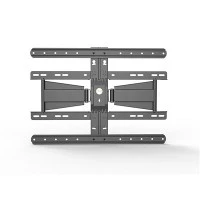
The first critical step in securing your TV to a heavy-duty cart is verifying compatibility between the TV and the cart’s mounting plate. This isn’t just about picking a cart that fits your TV’s screen size—it’s about matching the VESA pattern, weight capacity, and frame design. VESA (Video Electronics Standards Association) sets universal standards for the spacing of mounting holes on the back of TVs, which is why you’ll see labels like “VESA 400x400” or “VESA 600x400” on most large displays. If your heavy-duty rolling TV stand has a mounting plate that only supports VESA 400x400, and your 85-inch TV uses VESA 600x400, you can’t just force the holes to align—you’ll strip the mounting holes on the TV’s back, or put uneven stress on the plate. Even worse, if the cart’s weight capacity is 100 pounds but your TV weighs 110 pounds, the cart’s frame will flex over time, loosening the fasteners and creating a risk of the TV shifting. That’s why when you’re choosing a cart, it’s important to check its specs against your TV’s VESA pattern and weight. For example, our heavy-duty portable TV stands are rated for up to 150 pounds, with mounting plates that support VESA patterns from 100x100 up to 800x500, which means they work with nearly all 40 to 100-inch TVs on the market. If you’re working with a custom-sized display or a commercial-grade screen, you might need a cart with an adjustable mounting plate—another feature we include in many of our heavy-duty models, so you can fine-tune the hole spacing to match your TV exactly.
Next, don’t cut corners on hardware. I’ve seen too many installers grab random wood screws or drywall screws from a toolbox and use those to fasten the TV to the cart. That’s a recipe for disaster. The only hardware you should use is the bolts and washers that come with the cart, or heavy-duty, grade-5 or grade-8 bolts rated for the exact weight of your TV. Grade-5 and grade-8 bolts are made from high-strength steel, which can handle 2 to 3 times more tension than standard bolts, so they won’t snap or loosen under the stress of moving a heavy TV. Also, always use flat washers and lock washers—flat washers distribute the pressure of the bolt across the TV’s mounting hole, so you don’t crack the TV’s back panel, and lock washers prevent the bolts from vibrating loose as you roll the cart. Here’s a pro tip from our team: when you’re threading the bolts through the TV and the cart’s mounting plate, don’t over-tighten them. Over-tightening can strip the threads on the TV’s back panel, which are usually made of thin plastic or aluminum, or warp the cart’s mounting plate, throwing the TV out of alignment. Instead, use a torque wrench to tighten the bolts to the manufacturer’s recommended setting—for most heavy-duty TVs, that’s between 15 and 25 foot-pounds of torque. If you don’t have a torque wrench, a good rule of thumb is to tighten the bolts until they’re snug, then give them an extra quarter turn—just enough to eliminate any play between the TV and the plate.
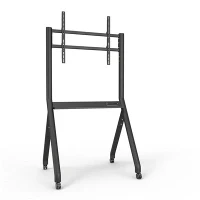
Once the TV is securely fastened to the mounting plate, you need to address the cart itself to make sure it doesn’t tip over, even when you’re moving it with a full TV. Heavy-duty TV carts come with two key features that work together to prevent tipping: a wide base and lockable casters, but many users don’t use them to their full potential. First, always deploy the cart’s support legs before placing the TV on it? Wait, no—wait, actually, most heavy-duty carts have a base that you assemble before mounting the TV, but once the TV is in place, the casters are a big part of stability. Wait, let me correct that: when assembling your heavy-duty rolling TV stand, make sure the base is fully extended to its widest point. A narrow base might be easier to store, but it drastically lowers the cart’s stability, especially with a heavy TV on top. Our heavy-duty models have a telescoping base that can extend from 30 inches to 48 inches, which means you can widen the base for large TVs (75 inches and up) to create a lower center of gravity, making the cart almost impossible to tip, even if you bump it into a wall or roll it over a small threshold. Second, always use the lockable casters when the cart is stationary, and make sure two casters are locked when you’re moving it. That might sound counterintuitive—if you lock two casters, you can only steer with the other two—but locking one set keeps the cart from rolling unexpectedly in high-traffic areas, like a busy classroom or conference room. We also recommend adding an anti-tip strap as an extra layer of security. Anti-tip straps are simple, heavy-duty nylon straps that attach the top of the TV’s frame to the cart’s upper frame, so if the cart is bumped from the side, the strap prevents the TV from sliding forward or tipping off the cart. A lot of people skip this step, but in our industry, it’s a standard safety feature that’s recommended by the CPSC for all mobile TV stands over 50 pounds.
Another common mistake we see is not testing the cart’s stability after installation. Even if you followed all the steps—matching VESA patterns, using the right bolts, widening the base, installing the anti-tip strap—you should always do a quick test to make sure the TV is secure. Here’s how: gently nudge the top of the TV from both sides and from the front, like you would if you were walking past it and brushing it by accident. If the TV shifts at all, that means the bolts are too loose, or the anti-tip strap is too slack. Next, roll the cart slowly back and forth on a flat floor, then pivot it sharply to the left and right, like you’re turning into a tight corner. If the cart wobbles, check that the casters are properly tightened and that the base is fully extended. If you’re using the cart on an uneven floor, like a classroom with old linoleum tiles or a warehouse with concrete slabs, take it over small bumps and make sure the TV doesn’t shift. If it does, you might need to adjust the bolt torque or add a rubber mat under the cart’s base to stabilize it.
Wait, let’s also talk about maintenance, because securing the TV is a one-time step, but keeping it secure over time is ongoing. Heavy-duty TV carts are designed to withstand frequent moves, but over time, vibration from rolling, temperature changes, and even cleaning can cause bolts to loosen. Every 3 to 6 months, you should inspect the bolts that fasten the TV to the mounting plate, check the anti-tip strap for signs of wear (like frayed edges), and make sure the casters are still functioning properly. If you’re using the cart in a high-traffic environment, like a convention center that moves it multiple times a day, you should do this inspection monthly. We also offer replacement hardware and anti-tip straps for all our heavy-duty portable TV stands, so you never have to worry about using worn-out parts that can compromise safety.
Now, let’s address a common question: do I need a heavy-duty cart for a large TV, or can I use a standard cart? The answer is, if your TV is 55 inches or larger, or weighs more than 50 pounds, a standard cart (which usually has a base capacity of 50 to 75 pounds) won’t be enough. Standard carts are built for small to medium TVs, and their narrow base and flimsy mounting plate can tip over or break under the weight of a large screen. Our heavy-duty rolling TV stands are designed with reinforced steel frames, 12-gauge steel mounting plates, and bases that can support up to 150 pounds, so they’re built to handle the demands of commercial and industrial use. We’ve tested our carts with 100-inch TVs, moving them over concrete floors, carpet, and even outdoor surfaces, and they pass all CPSC safety standards because we engineered them with security in mind.
At the end of the day, securing a TV to a heavy-duty cart isn’t just about following a checklist—it’s about prioritizing safety for your team, your equipment, and your audience. A few extra minutes of checking VESA patterns, using the right hardware, and testing stability can save you thousands of dollars in replacement costs and, more importantly, prevent a serious injury. If you’re in the market for a heavy-duty TV cart that’s built for maximum security, we’ve got a range of options to fit your needs, from portable stands for small event spaces to heavy-duty models for large conference rooms and auditoriums. Whether you need a cart for a 65-inch office TV or a 98-inch commercial display, we can help you find the right fit, and our team is always available to answer questions about installation and security. If you’re ready to discuss your specific needs and request a custom quote, get in touch with our sales team today.
References:


- U.S. Consumer Product Safety Commission. (2022). Annual Report on TV-Related Injuries and Incidents. Washington, D.C.: CPSC.
- Video Electronics Standards Association (VESA). (2021). Standard for Flat Panel Display Mounting Interfaces (VESA FBMI-2021). San Jose, CA: VESA.
- National Fire Protection Association (NFPA). (2020). Fire Prevention and Safety Guidelines for Commercial AV Equipment. Quincy, MA: NFPA.
- Heavy-Duty Equipment Manufacturers Association (HDEMA). (2023). Safety Standards for Mobile Display Stands. Arlington, VA: HDEMA.