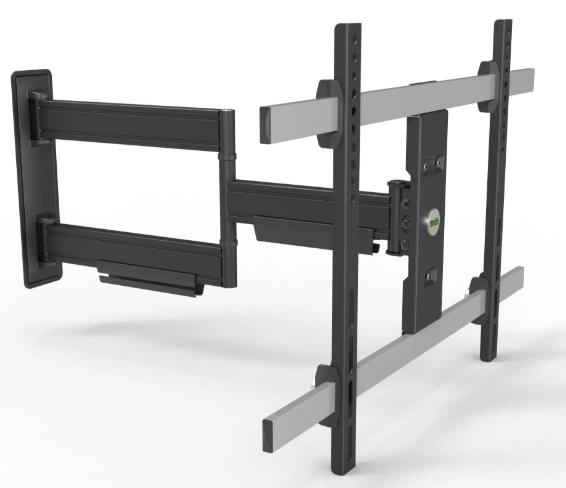


A securely mounted TV not only enhances your viewing experience but also eliminates the risk of accidents, protecting your expensive device and ensuring the safety of your family-especially children and pets. TV mount instability is a common issue that can lead to costly damage or even injuries, but it is entirely preventable with proper planning, installation, and maintenance. This guide breaks down the key steps to ensure your TV mount remains stable and secure for years to come.
1. Choose the Right TV Mount for Your Needs
Check Weight Capacity: Every TV mount has a maximum weight limit, a rigorously tested standard that should never be exceeded. Think of this limit like an elevator's load capacity-it is non-negotiable. Manufacturers often test mounts to handle up to four times their advertised capacity to account for long-term metal fatigue and subtle dynamic forces, but this safety margin is not an excuse to cut corners. First, find your TV's exact weight (excluding the stand) and choose a mount with a weight limit that exceeds this by at least 20% to add a safety buffer.
Ensure VESA Compatibility: VESA (Video Electronics Standards Association) pattern is a universal standard that dictates the distance between the mounting holes on the back of your TV. A compatible VESA pattern ensures the TV's weight is evenly distributed across the mount's backplate, preventing dangerous stress points that can weaken stability over time. Check your TV's manual or the manufacturer's website for its VESA dimensions, and match them to the mount's specifications.
Select the Right Mount Type: Different mount types have varying stability considerations:
Fixed mounts: These keep the TV flush against the wall, offering the highest stability because they minimize stress on the mount and wall. They are ideal for static viewing positions.
Tilt mounts: These allow slight upward or downward adjustment. While still stable, ensure the tilt mechanism is securely locked after positioning to avoid gradual shifting.
Full-motion mounts: These extend and swivel, providing maximum flexibility but increasing stress on the mount and wall due to the torque created when extended. For these mounts, extra care in installation (e.g., securing to studs) is critical to maintain stability.
2. Prepare the Mounting Surface Properly
Assess Wall Integrity: The strength of your wall is just as crucial as the mount itself. For drywall walls, always anchor the mount to wooden or metal studs-drywall alone cannot support the weight of a TV, even with plastic anchors. Use a stud finder to locate studs (typically 16 or 24 inches apart in most homes) and mark their positions clearly. For concrete or brick walls, use masonry anchors and drills designed for these materials to ensure a secure hold.
Avoid Weak Wall Areas: Do not mount your TV above fireplaces (many decorative fireplaces are not structurally sound), near windows (where wall studs may be spaced irregularly), or on walls with hidden plumbing or electrical wiring. Drilling into these areas not only compromises stability but also poses safety hazards.
For Freestanding Mounts: If using a mobile or freestanding TV stand, prioritize models with a wide, heavy (base) to lower the center of gravity and reduce the risk of tipping. Ensure the base has a large enough contact area with the floor, and avoid placing the stand on uneven surfaces. For mobile stands, choose models with large, bearing-equipped wheels to minimize shaking during movement and protect the TV from jolts.
3. Follow Proper Installation Steps
Gather the Right Tools: You will need a stud finder, level, drill (with bits for your wall type), screwdriver, and the hardware provided with the mount. Do not substitute the included screws or bolts with random ones from your toolbox-manufacturers provide hardware specifically rated to support the mount and TV weight.
Mark and Drill Carefully: Use the mount's backplate as a template to mark the drill holes on the wall, aligning them with the studs. Double-check the alignment with a level to ensure the mount is straight-even a slight tilt can cause uneven weight distribution over time. Drill pilot holes to make inserting screws easier and prevent wall damage.
Secure the Mount Firmly: Attach the mount to the wall using the provided screws, tightening them fully but not over-tightening (which can strip the holes or damage the mount). For full-motion mounts, ensure all swivel and extension mechanisms are properly lubricated and locked in place when not in use.
4.Perform Regular Maintenance and Inspections
Stability is not a one-time task-regular checks ensure your mount remains secure over time. Set a reminder to inspect your TV mount every 3–6 months:
Tighten Loose Fasteners: Check all screws, bolts, and brackets for looseness. Over time, vibrations and temperature changes can cause hardware to loosen, so tighten them gently as needed.
Check for Wear and Tear: Inspect the mount for signs of rust, bending, or cracks-these are red flags that the mount may fail. Replace any damaged components immediately.
Verify TV Alignment: Ensure the TV is still level and centered on the mount. If it has shifted, adjust the brackets or tilt mechanism to restore balance.
Ensuring TV mount stability is a combination of choosing the right mount, preparing the surface properly, following correct installation steps, and performing regular maintenance. By prioritizing compatibility, quality, and attention to detail, you can enjoy your TV with peace of mind, knowing it is securely mounted and safe for everyone in your home. Remember, the extra time spent on proper setup is far less than the cost and hassle of replacing a damaged TV or dealing with an accident.