

Can I adjust the height of an ultra slim tv mount?
As a supplier of ultra slim TV mounts, this is a question I often encounter from customers. The short answer is yes, in most cases, you can adjust the height of an ultra slim TV mount, but it depends on several factors. In this blog post, I'll delve into the details of height adjustment for ultra slim TV mounts, the types of mounts that offer this feature, and how to make the adjustment process smooth and hassle - free.


Why Height Adjustment Matters
Before we discuss how to adjust the height, let's understand why it's important. Different viewing scenarios require different TV heights. For example, when you're sitting on a couch, the ideal TV height is at eye - level to reduce neck strain. If you're using the TV in a standing position, such as in a commercial setting or a workout area, the height needs to be adjusted accordingly. Also, if you change your furniture or the layout of the room, you may need to re - position the TV for optimal viewing.
Types of Ultra Slim TV Mounts and Height Adjustment
Fixed Ultra Slim TV Mounts
Fixed ultra slim TV mounts are designed to hold the TV close to the wall, giving a sleek and minimalist look. These mounts typically have limited height adjustment options. In some cases, they may have a small range of vertical adjustment, usually up to a few inches. This is often achieved through slots or holes in the mounting brackets that allow for minor re - positioning. However, if you need a significant height change, a fixed mount may not be the best choice.
Tilt Ultra Slim TV Mounts
Tilt ultra slim TV mounts offer more flexibility than fixed mounts. In addition to the ability to tilt the TV up or down, some tilt mounts also allow for height adjustment. Similar to fixed mounts, the adjustment range may be limited, but it's generally more than what a fixed mount can offer. The height adjustment mechanism usually involves loosening some screws or bolts and then sliding the TV up or down along the mounting brackets.
Full - Motion Ultra Slim TV Mounts
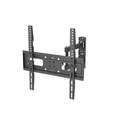
Full - motion ultra slim TV mounts, such as the Ultra Slim Full Motion Tv Wall Mount 65 Inch, are the most versatile when it comes to height adjustment. These mounts can extend the TV away from the wall, swivel left and right, tilt up and down, and also provide a relatively large range of height adjustment. They are ideal for situations where you need to change the TV's position frequently or for multiple viewing angles. The height adjustment on full - motion mounts is often achieved through a telescopic or sliding mechanism that allows you to move the TV up or down smoothly.
Factors Affecting Height Adjustment
Mounting Surface
The type of wall or surface where the TV mount is installed plays a crucial role in height adjustment. If the mount is installed on a solid concrete or brick wall, it can support more weight and movement, making height adjustment easier. On the other hand, if the wall is made of drywall, you may need to use additional wall anchors or studs to ensure the mount is secure during the adjustment process.
TV Size and Weight
Larger and heavier TVs require more robust mounts and may have more limited height adjustment options. The weight of the TV can put stress on the adjustment mechanism, so it's important to choose a mount that is rated for the specific size and weight of your TV. For example, a 65 - inch TV will need a mount with a higher weight capacity than a 32 - inch TV.
How to Adjust the Height of an Ultra Slim TV Mount
Step 1: Prepare the Tools
Before you start adjusting the height, gather the necessary tools. This may include a screwdriver, a drill (if you need to re - drill holes), and a level to ensure the TV is straight after the adjustment.
Step 2: Unplug the TV
For safety reasons, unplug the TV from the power source and any other connected devices. This will prevent any electrical hazards during the adjustment process.
Step 3: Loosen the Mounting Hardware
Locate the screws or bolts that hold the TV to the mount. Depending on the type of mount, you may need to loosen these to allow for height adjustment. Be careful not to remove the screws completely, as this could cause the TV to fall.
Step 4: Adjust the Height
Once the mounting hardware is loosened, you can start moving the TV up or down to the desired height. Use the adjustment mechanism of the mount, such as slots, telescopic arms, or sliding rails, to make the change. Make sure to move the TV slowly and evenly to avoid any sudden movements.
Step 5: Check the Level
After adjusting the height, use a level to ensure the TV is perfectly horizontal. This will give you the best viewing experience and prevent any visual distortion.
Step 6: Tighten the Mounting Hardware
Once the TV is at the correct height and level, tighten the screws or bolts to secure the TV to the mount. Make sure they are tightened firmly, but be careful not to overtighten, as this could damage the mount or the TV.
Tips for a Successful Height Adjustment
- Read the Mount's Manual: Before attempting any height adjustment, carefully read the manufacturer's manual. It will provide specific instructions and safety guidelines for your particular mount.
- Have a Helper: Adjusting the height of a TV can be a two - person job, especially for larger TVs. Having a helper can make the process safer and easier.
- Test the Mount: After making the height adjustment, test the mount by gently moving the TV back and forth to ensure it is stable.
Contact for Purchase and Consultation
If you're in the market for an ultra slim TV mount with excellent height adjustment capabilities, or if you have any questions about our products, we're here to help. Whether you need a fixed, tilt, or full - motion mount, we have a wide range of options to suit your needs. Reach out to us to discuss your requirements, and we'll be happy to provide you with the best solutions and advice.
References
- Various TV mount manufacturers' product manuals
- Industry standards and guidelines for TV mounting